Save it now.
Find it later.
One click saves any page, link, image or note to a visual library you can search by what you remember.
Free to use.
No password, just an email link.
Save from anywhere, in one click.
Click the Unfaded icon and the page is in your library, with its title, description and preview image fetched for you.

- Click
- Saved
- In your library
Click
Saved
In your library
- In Chrome
- Click the Unfaded icon to save the page you're on. Right-click to save just a link, an image or the text you selected, with tags and a note if you want them.
- In the web app
- Paste a link or a note into the box at the top, or drop a file anywhere on the page.
- On iPhone
- Save from the share sheet with an Apple Shortcut you set up in Settings. The iPhone app is coming soon.
The Chrome extension is on its way to the Chrome Web Store.
Start in the web appFind it by what you remember.
Everything you save lands in one library, newest first. Type a word you remember and the grid narrows to what matches.
- A visual library.
- Preview images, favicons and domains, so you can scan by sight. Links, images, text, notes and files sit side by side.
- Search what you remember.
- Full-text search across your library.
- Tags and notes.
- Add them when you save from the extension, or edit the title and tags later.
- Undo and restore.
- Deleted items wait in Recently deleted until you restore them or erase them for good.
Your agents can use it too.
Connect ChatGPT, Claude, Grok or any other MCP client. Your agents can search your library, open an item, and save new links and notes. Disconnect an app in Settings and the access ends.
- Claude
- ChatGPT
- Grok
- Any MCP client
> What did I save about Lisbon?
search_items "lisbon"
2 saved items
Your itinerary for 14 to 18 November, and a tip: walk up to Graça and take tram 28 down.
claude mcp add --transport http unfaded https://unfaded.io/api/mcp --header "Authorization: Bearer unfd_••••"Your library is yours.
No ads, no tracking cookies, and an extension that only reads a page when you click to save it.
Stored in the EU.
Your saved items and account data are stored in the EU, on Supabase in eu-west-1 (Ireland).
No ads. No tracking cookies.
The app and extension don't track you.
On this website we count visits anonymously, without cookies.
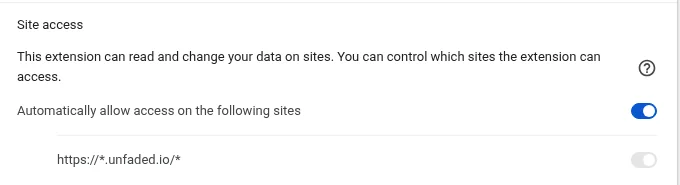
The extension asks only for unfaded.io at install.
It reads a page only when you click to save it.
Export or delete anytime.
You can do both yourself, in Settings.
We don't sell your data.
You keep all rights to what you save.
Isolated and protected.
Each account's data is isolated at the database level, data is encrypted in transit, and API keys are stored only as hashes.
Questions, answered.
Is Unfaded free?
Yes, Unfaded is free for now. You create an account with just your email.
How do I sign up?
Enter your email on the sign-in page and we send you a magic link. Click it and you're in, with no password. The same form works for new and returning users.
What can I save?
Pages, links, selected text, images, notes and files. Save them from the Chrome extension, by pasting into the web app, or by dropping a file onto it.
What does the Chrome extension need access to?
At install, only unfaded.io. It reads a page only when you click to save it. Wider access is optional and only requested from its Settings, either for a self-hosted server or to upload image files instead of saving their address.
How do I connect the extension to my account?
In the web app, open Settings → API keys, create a key and paste it into the extension's Settings. The key is shown only once, and it's only ever sent to your Unfaded server.
Where is my data stored, and who can see it?
Your saved items and account data are stored in the EU (Supabase, Ireland). Each account is isolated at the database level, and we don't sell your data. The app and extension don't track you and show no ads; on this website we count visits anonymously, without cookies. The privacy policy lists the few providers that help run the service.
Can I get my data out?
Yes. Export everything or delete your account yourself, in Settings, at any time.
Does it work with Claude and other AI tools?
Yes, over MCP. Create an API key, add Unfaded to Claude Code or Claude Desktop (Settings has the exact setup), and your agents can search, read and add to your library. Revoke the key and the access ends.
Is there an iPhone app?
It's coming soon. Today you can save from the iPhone share sheet with an Apple Shortcut; the setup guide is in Settings.
Start keeping what matters.
Create your free account with just your email. Add the Chrome extension when you're ready.